If you’ve ever worked with a CNC turning center—whether you’re a machinist, a setup tech, or someone who’s just spent way too long troubleshooting a wonky batch of parts—you’ve probably run into backlash. It’s that annoying, unintentional “play” between moving parts that turns a clean cut into a lumpy surface, or makes a precision diameter end up a few thousandths off. And if you’re buying CNC turning centers (or already own one), backlash compensation isn’t just a buzzword—it’s the thing that separates a machine that works from one that works for you. Let’s break this down like we’re chatting over a coffee at the shop, no textbook jargon overload. CNC Turning Centers
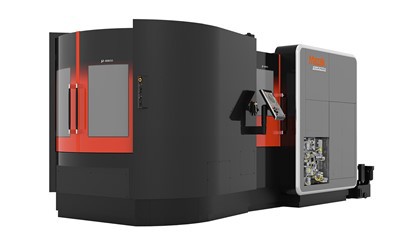
First, let’s keep it real: what even is backlash, anyway? Forget the fancy definitions. If you’ve ever turned a bolt and the head spins a tiny bit before the thread catches? That’s backlash. In a CNC turning center, it’s the same idea, but between the ballscrew and the nut that moves your tool post along the X or Z axis. Over time, that play builds up—from wear and tear on your machine, maybe even from cheap components when you bought it, or just from years of reversing direction when you’re cutting a shoulder or threading a part. When your controller tells the tool to move left, but the ballscrew spins a little before the nut actually pulls the tool left? That extra space is backlash. It’s not your machine being “bad”—it’s just physics, and physics hates being ignored.
So what’s backlash compensation? Simply put, it’s the fix. Your CNC controller (that little brain that runs everything) stores a tiny number in its memory: how much play is in your axes. When you tell the machine to reverse direction—like going from moving the tool away from the part (positive Z) to toward it (negative Z)—it automatically adds that compensation number to the command. That way, the tool doesn’t wait for the ballscrew to catch up; it jumps straight to the position it’s supposed to be in, no extra space. Let’s make this concrete: say your X axis has 0.002 inches of backlash. When you program a move that goes from X1 to X2, your controller says, “Wait, reverse direction—add 0.002 inches here, so we don’t miss the mark.” That’s the magic of it.
Now, let’s cut to what this means for you, because I know you don’t care about the tech just for the tech’s sake. If you’re making, say, a medical screw with a 0.0005-inch tolerance? Backlash is your enemy. Without compensation, each time you reverse the tool, you get that 0.002-inch blip—enough to make that screw too loose or too tight for the surgeon to use. But if your CNC turning center has good backlash compensation, that blip is gone. We’re talking consistent parts, less scrap, fewer headaches. I see it all the time with our customers: a shop that was fighting 15% scrap on threaded parts suddenly drops that to 2% once they calibrate compensation properly. That’s money in your pocket, right there.
But wait—backlash compensation isn’t a “set it and forget it” deal. A lot of new operators (or even some shops that bought used CNC turning centers) think they just punch in a number once and walk away. Nope. Here’s the thing: backlash changes over time. If you run your machine 24/7, that ballscrew is wearing a little more each day. If you’re cutting tough materials like titanium, that wear speeds up. Even the temperature in your shop plays a role—metal expands in heat, so a 90-degree summer day might change your backlash by a few tenths, while a cold winter morning changes it another bit. That’s why regular calibration matters. We tell all our customers: every 500 operating hours, or whenever you start seeing inconsistent dimensions on parts, pull out a dial indicator and measure the backlash yourself. Don’t trust the controller’s old number—verify it.
Let me walk you through how we teach customers to do this (it’s super simple, I promise). Grab a dial indicator, mount it to your tool post so the probe is touching a solid part of the machine’s bed (or a fixed object). Set the indicator to zero. Now, move the axis one direction until the indicator just starts to move. Note that number. Then reverse the direction, and watch how much the indicator moves before it also starts moving the other way. That’s your backlash. Write that number down, go into your controller’s settings, and input it. Done. It takes 10 minutes, and saves you from wasting hours reworking parts.
Now, if you’re in the market for a CNC turning center, here’s a pro tip: not all backlash compensation is created equal. Some cheap machines use a basic “add a fixed number” system, which works for simple cuts but falls apart when you’re doing complex profiling or high-tolerance work. The good stuff—what we build into our CNC turning centers—lets you adjust backlash compensation per axis, even for small incremental moves. Like, if you’re making a tiny shoulder on a 1-inch part, the controller knows to use a smaller compensation value for a 0.010-inch move, vs. a 1-inch move, to avoid overcompensating. That’s the difference between a machine that can handle a $10 part and one that can handle a $10,000 part.
I’ve had customers come to us after buying a “budget” CNC turning center from another brand, complaining that their backlash is so bad they can’t thread parts above 10 threads per inch. When we calibrate the backlash compensation on our machines, same shop, same operator, they’re threading 40 TPI with zero issues. That’s the kind of difference we deliver. Also, our machines have a built-in auto-backlash check tool—so you don’t even have to pull out a dial indicator. The controller runs a quick test on its own, measures the play, and sets the compensation number automatically. It’s one less thing for you to worry about, especially if you’re short-staffed and can’t spare a setup tech for a calibration.
Wait, but let’s be honest about the limits here. Backlash compensation isn’t a magic wand. If your axis has 0.010 inches of backlash, and you’re trying to hold a 0.001-inch tolerance, compensation can only do so much. It can’t fix a worn-out ballscrew or loose nuts—those are physical problems. If your operator has to push the tool through a big gap before it moves, compensation can’t make that gap disappear. That’s why, when you’re investing in a CNC turning center, it’s worth paying for quality components up front. Our machines use precision-ground ballscrews and pre-tensioned nuts, so the initial backlash is minimal (usually less than 0.001 inches) and wears slow. That means the compensation number stays accurate longer, and you don’t have to mess with calibration every month.
I also see a lot of operators mixing up backlash compensation with other fixes, like lead screw backlash adjustment (which is a physical tweak to the machine, not the controller). Adjusting the lead screw requires taking the machine apart, shimming nuts, and it’s a big job. Backlash compensation is software-based, so it’s fast and reversible—no tearing down your machine when you change materials or switch parts. That’s why it’s such a go-to for daily use.
Let me give you a real example from a customer of mine: a small job shop that does custom aerospace parts. They had a used CNC turning center they’d had for 5 years, and they were struggling with a new contract for aircraft hydraulic fittings that needed ±0.0003-inch tolerance. They called us, and we sent a tech to calibrate the backlash compensation and run a few test cuts. After that, their scrap rate on the fittings dropped from 22% to 3%, and they landed another big order because they could deliver parts on time. That’s exactly why we focus on this stuff—we don’t just sell machines; we solve the problems that keep you up at night.
Now, if you’re reading this and thinking, “I need a CNC turning center that doesn’t make me fight backlash,” or “My current machine’s compensation is too flimsy,” don’t overcomplicate it. Backlash compensation is one of those features that sounds technical, but it’s actually about making your job easier. You shouldn’t have to be a machine calibration expert to get consistent parts. If you’re ready to upgrade your equipment, or just want to talk through what we can do for your shop, we’re here. No pushy sales pitch, just real advice from people who build these machines and work with shops every day. Reach out, tell us what you’re making, and we’ll help you figure out what kind of backlash setup works for your parts.
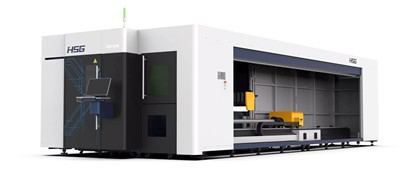
At the end of the day, backlash isn’t going anywhere. It’s part of how CNC machines work. But with the right compensation—quality components, easy calibration, controller tools that actually work—you can turn that annoying play into something that works for you. That’s the point, right? A good CNC turning center doesn’t just cut metal; it lets you hit your deadlines, keep scrap low, and make parts you’re proud of. And that’s exactly what we build.
Laser Processing Machine References
- Smith, J. (2021). CNC Machining Basics: Backlash and Compensation Strategies. Industrial Press.
- National Institute of Standards and Technology (NIST). (2019). Geometric Dimensioning and Tolerancing for CNC Systems.
- Davis, R. (2022). Maintenance Tips for CNC Turning Centers: Avoiding Common Backlash Issues. Manufacturing Engineering Magazine.
Hermens Industrial Co., Ltd.
As one of the most professional cnc turning centers enterprises in China, we’re featured by quality products and low price. Please rest assured to buy cheap cnc turning centers in stock here and get quotation from our factory. We also accept customized orders.
Address: 9/59 Moo 14, Rachathewa , Bang Phli , Samut Prakan Province 10540
E-mail: liu_jincheng@hzhemen.com
WebSite: https://www.hermensindustrial.com/
